Tutorials • WHM
Creating a cPanel account in WHM
Learn how to create a new hosting account in WHM. Follow the simple steps to complete the necessary information and customize the service package.
Views 1795Updated 1 anPublished on 31/05/2018by Cătălin A.
Introduction
This tutorial explains how to create a new hosting account in the WHM administration panel of a reseller.
Requirements
- a WHM account
Steps to Follow
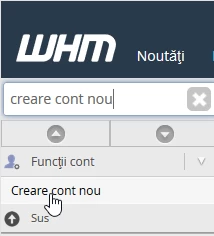
- after logging into the WHM control panel, in the interface that will be displayed, we look in the top left window for "Create a new account"
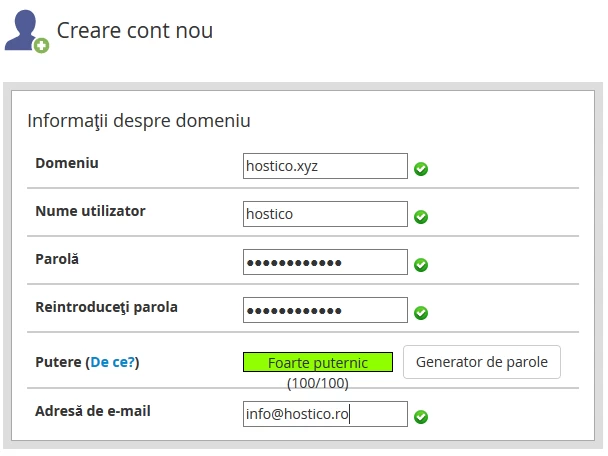
- after clicking on the result, the window that will display must have the account details filled in: domain name, user, password, and email address
- there is also the possibility to set the package offered to the account in the same window.
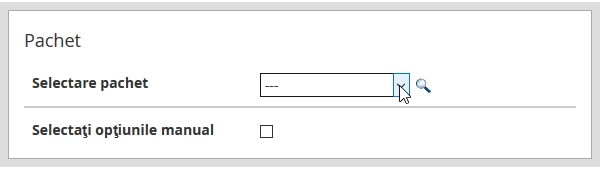
- if a package has not been predefined, the options can be selected manually by checking the box "Select options manually"

- after completing this step there is the option to save the configuration as a predefined package by checking the box "Manual Settings are saved as Package" and setting a name
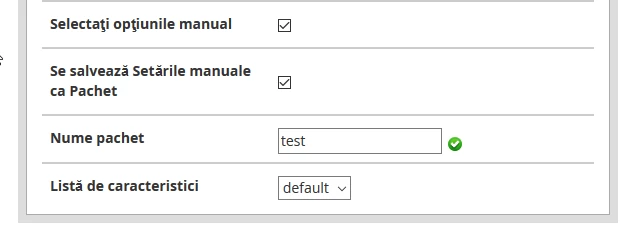
- after setting the preferences for these options, press the "Create" button at the bottom of the page. The rest of the options remain unchanged.