🌞 Summer Sale — Up to 70% discount for hosting and domains
activate now
TutorialsCommercial

Invoice comparison

Quickly and easily combine outstanding proforma invoices in your Hostico account. Follow the steps in our guide to obtain the correct final invoice.

Views 1250Updated 2 aniPublished on 07/01/2022by Mark D.

Introduction

The tutorial presents the steps to be followed in order to combine two or more proforma invoices.

Requirements

  • Hostico client account
  • 2 or more outstanding invoices

Steps

  • Select the Financial section from the left side of the customer account;
  • In the Actions section, the MERGE option will be selected;
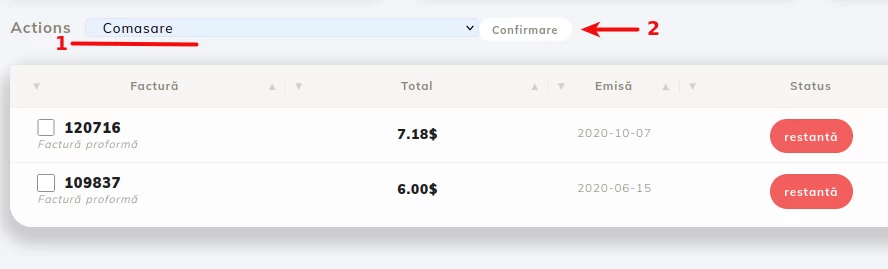
  • In the outstanding invoices window, select the invoices you wish to combine, then click the Confirmation. box.
  • The final step will open a new window with the final invoice, encompassing all the services.

Note

Invoice services will not be modified regarding the due date.
The total of the final invoice will be the exact sum of service fees + the corresponding VAT, the amount may vary since the new invoice will be issued at the BNR exchange rate on the day of issuance.

Similar Articles

Creating an email account in cPanelTutorials /cPanel

The cPanel allows for the creation of an unlimited number of email accounts associated with hosted domains. This tutorial will explain the necessary steps to create and access an email account.

29
by Cătălin A.
Views 5628
Updated 2 years ago
Published on 28/06/2017
Adding a secondary contact (Subcontact)Tutorials /Commercial

Add a secondary contact in your Hostico client account by following these simple steps. Make sure you have an existing account and activate the necessary rights.

27
by Mark D.
Views 2918
Updated 2 years ago
Published on 08/07/2017
Cancellation of hosting services.Tutorials /Commercial

In this tutorial, we illustrate the process of canceling a hosting service from the Hostico client account.

23
by Mark D.
Views 2091
Updated 2 years ago
Published on 04/06/2018
Modification of the proforma invoiceTutorials /Commercial

In this tutorial, the actions necessary for modifying the data of an unpaid pro forma invoice are presented.

15
by Mark D.
Views 6301
Updated 3 years ago
Published on 29/05/2019
Authentication in cPanel from the client account.Tutorials /Commercial

This tutorial will illustrate the procedure that can be used to log into the cPanel of a hosting service from the Hostico client account.

12
by Mark D.
Views 6121
Updated 1 year ago
Published on 05/06/2018