🌞 Summer Sale — Up to 70% discount for hosting and domains
activate now
TutorialsPlesk

Webspace Plesk

Manage your domains with Plesk Webspace! Learn how to set up websites, manage IPs, and use SSL for security.

Views 659Updated 1 anPublished on 03/06/2019by Florin P.

Introduction

  • The Plesk control panel uses Webspace to manage access to domains and control panel features.


Requirements

  • Access to the administration panel, user and password provided by Hostico.


Steps

  • After logging in, on the right side of the page we have the Webspace menu available.
  • Each webspace can have multiple domains, it is associated with an IP address, an SSL certificate, and credentials for FTP access restriction.
  • To configure different sites on different IP addresses, we will use multiple web spaces.
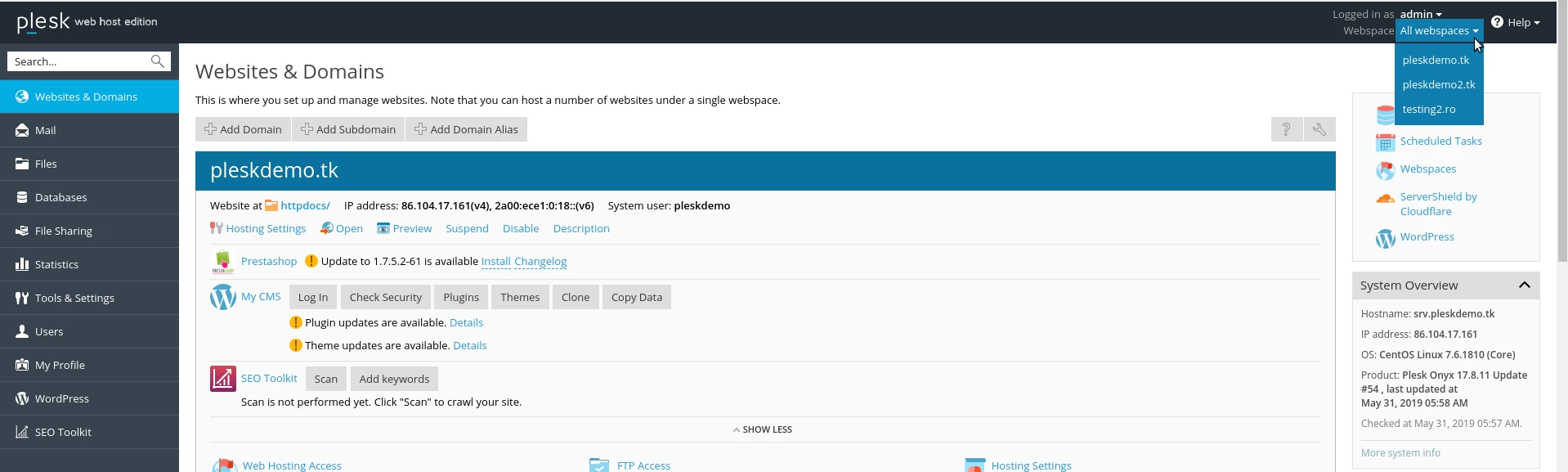
 

Websites Domain Plesk

Similar Articles

Transfer .ro domainTutorials /Domains

This tutorial presents the steps necessary to obtain the authorization key from the ROTLD panel for transferring a .ro domain to a new registrar.

78
by Mark D.
Views 3128
Updated 2 years ago
Published on 06/02/2018
Changing the PHP version in cPanel on VPS hosting packages via MultiPHP ManagerTutorials /cPanel

In this article, we will present the necessary steps to change the PHP version in a cPanel account using MultiPHP Manager.

46
by Sebastian S.
Views 2894
Updated 2 years ago
Published on 18/10/2017
Unblocking the IP from Hostico serversTutorials /Dev

In this tutorial, the necessary steps will be presented to unblock the IP listed in the firewall on Hostico servers.

32
by Mark D.
Views 1455
Updated 1 year ago
Published on 05/10/2020
Creating an email account in cPanelTutorials /cPanel

The cPanel allows for the creation of an unlimited number of email accounts associated with hosted domains. This tutorial will explain the necessary steps to create and access an email account.

29
by Cătălin A.
Views 5628
Updated 2 years ago
Published on 28/06/2017
Adding a secondary contact (Subcontact)Tutorials /Commercial

Add a secondary contact in your Hostico client account by following these simple steps. Make sure you have an existing account and activate the necessary rights.

27
by Mark D.
Views 2918
Updated 2 years ago
Published on 08/07/2017