Tutorials • Plesk
Plesk DNS Settings
Find out how to edit DNS records in Plesk. Follow the steps to modify or add records and manage your domains efficiently.
Views 1272Updated 1 anPublished on 16/07/2021by Alexandru J.
Introduction
- In this tutorial, we will explain how to edit/set DNS records in the Plesk administration panel.
Requirements
- A Plesk account
Steps
- After logging in to the Plesk control panel, we will go to the Websites and Domains section where we will choose the domain for which we want to modify the DNS zone and click on Hosting & DNS, then on DNS Settings to the right of it.
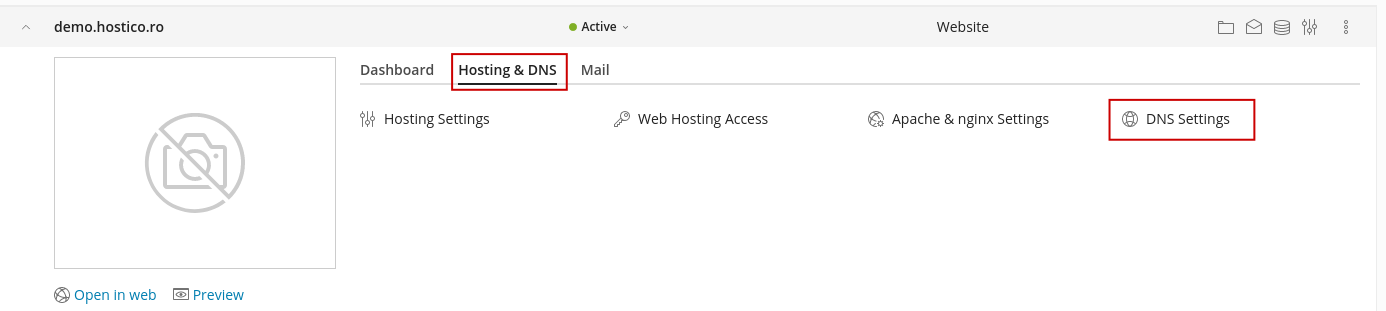
- In this window we can add edit an entry that exists by clicking on it or to add a new one with the Add Record button.

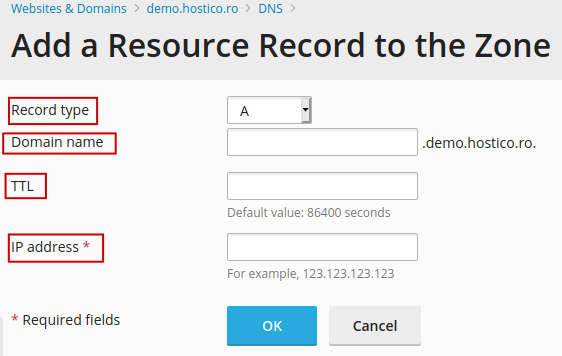
- In the addition window, we have the following sections:
- For Record Type, we select the type of DNS record we want to add.
- At Domain Name, we will have the option to select the desired domain or subdomain to be used.
- TTL (Time to Live) is the lifespan of the DNS cache for that record. The values are specified in seconds and the default value is 14400.
- The last field varies depending on the type of record selected earlier: Example: (A - we will enter the destination IP, CNAME - we will enter the destination domain, and TXT - we will enter the txt code)
- To delete a DNS record from the Plesk panel, we will check the respective line and use the X Remove button at the top right.
