🌞 Summer Sale — Up to 70% discount for hosting and domains
activate now
TutorialsCommercial

Open support ticket.

Learn how to open a support ticket on Hostico, step by step, including requirements and filling in the necessary fields.

2
Views 1214Updated 1 anPublished on 15/07/2017by Mark D.

Introduction

Requirements

Steps

  • After logging into the client account, you will need to access the Tickets section on the left side of the page;
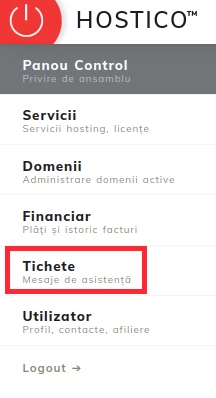
In the new window, we will fill in the displayed fields as follows:

1. Subject - the subject of the request is noted;
2. Message - description of the request;
3. Attachments - click on the plus sign (+) if you want to attach an image, document, file;
4. Department - select the department you wish to contact;
5. Associate Product - click on the service you want to discuss;
6. Priority - select the desired priority level;

To submit the request after filling in the fields, you will need to click on the Open Ticket. button.

Similar Articles

Creating an email account in cPanelTutorials /cPanel

The cPanel allows for the creation of an unlimited number of email accounts associated with hosted domains. This tutorial will explain the necessary steps to create and access an email account.

29
by Cătălin A.
Views 5626
Updated 2 years ago
Published on 28/06/2017
Adding a secondary contact (Subcontact)Tutorials /Commercial

Add a secondary contact in your Hostico client account by following these simple steps. Make sure you have an existing account and activate the necessary rights.

27
by Mark D.
Views 2916
Updated 2 years ago
Published on 08/07/2017
Cancellation of hosting services.Tutorials /Commercial

In this tutorial, we illustrate the process of canceling a hosting service from the Hostico client account.

23
by Mark D.
Views 2090
Updated 2 years ago
Published on 04/06/2018
Modification of the proforma invoiceTutorials /Commercial

In this tutorial, the actions necessary for modifying the data of an unpaid pro forma invoice are presented.

15
by Mark D.
Views 6301
Updated 3 years ago
Published on 29/05/2019
Authentication in cPanel from the client account.Tutorials /Commercial

This tutorial will illustrate the procedure that can be used to log into the cPanel of a hosting service from the Hostico client account.

12
by Mark D.
Views 6120
Updated 1 year ago
Published on 05/06/2018