Tutorials • Plesk
Deleting a subscription in the Plesk administration panel
In this article, we will present the necessary steps to delete a site/subscription in the Plesk administration panel.
Views 974Updated 1 anPublished on 07/02/2020by Alexandru J.
Introduction
- If we no longer wish to host a site and/or want to free up disk space, we will log in to the panel and follow the steps described below.
- This action will involve the deletion of all data associated with the deleted account.
Requirements
- Access to the Plesk administration panel, username, and password.
Steps
- First, we will log in to the administration panel.
- Deleting all data belonging to a site/subscription in the Plesk panel can be done from the configuration menu associated with it.
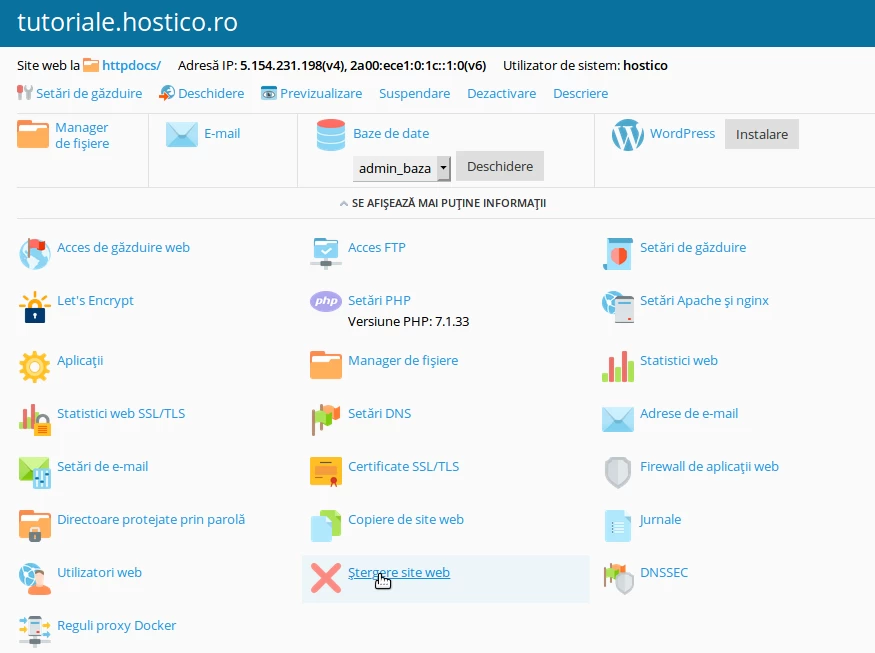
- After selecting the option, a confirmation window for the action will be displayed on the screen.
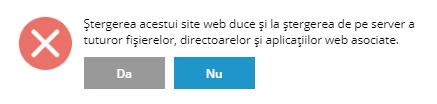
- Attention, this procedure will delete all information related to the site: email accounts, files, and the database, as well as its registration in the Plesk control panel.