Tutorials • WHM
Delete cPanel account
Learn how to delete cPanel accounts from WHM. Follow the simple steps to remove the desired accounts and manage resources effectively.
1
Views 1314Updated 2 aniPublished on 22/06/2018by Cătălin A.
Introduction
This tutorial explains how to delete one or more cPanel accounts from the WHM reseller's administration panel.
Requirements
- a WHM account
Steps to Follow
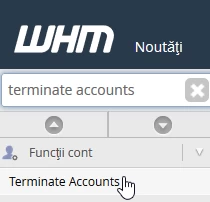
- Once logged into the WHM administration panel, search in the top left search box for "Terminate Accounts" and select the obtained result
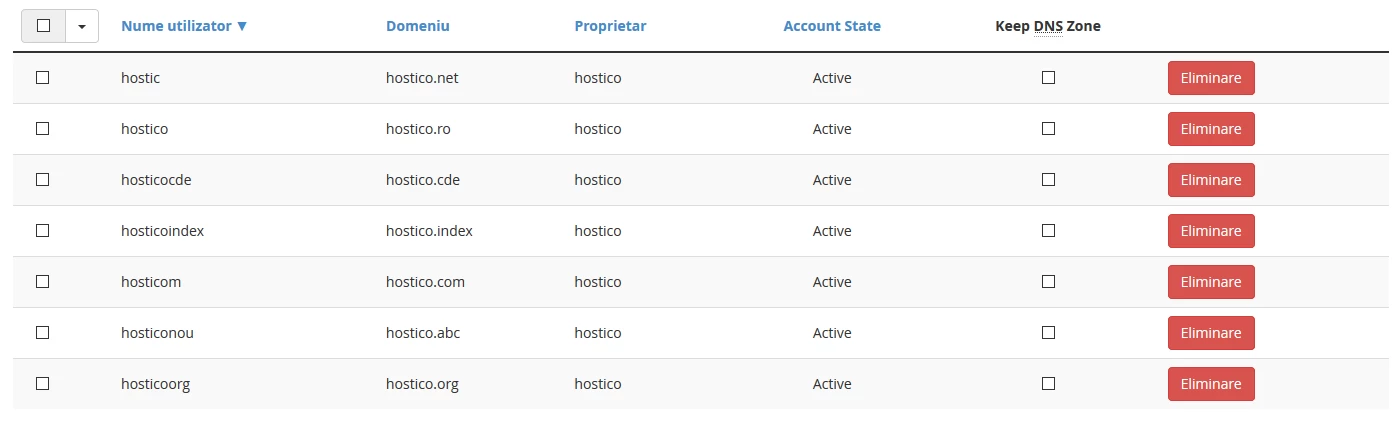
- in the next window, a list will be displayed with all the accounts owned by the reseller
- to find a specific account, you can use the search box on the page

- if you want to display only suspended accounts, check the "Show only suspended accounts" box

- once the account to be deleted is selected, press the "Remove" button to the right of it

- a message will appear with the account information along with a button that will request confirmation of its deletion
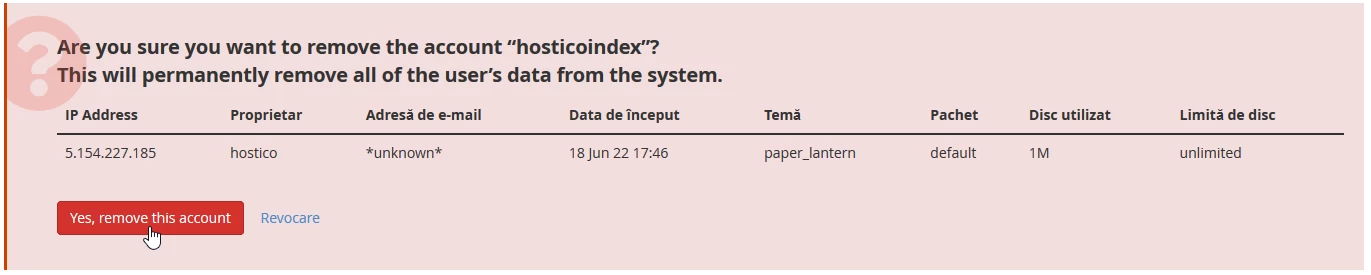
- after confirming the deletion and successfully completing the operation, a confirmation message will be displayed in the upper right corner of the page
