Tutorials • Commercial
Delete Client Account
Learn how to permanently delete your Hostico client account in simple steps. The deletion confirmation will remove all personal data, with no possibility of recovery.
1
Views 1830Updated 11 luniPublished on 10/08/2020by Mark D.
Introduction
This article will guide you through the necessary steps for permanently deleting a Hostico customer account.
Requirements
- An existing customer account at Hostico.
Steps
- Log in to your Hostico client account, then access the User section on the left side of the page.
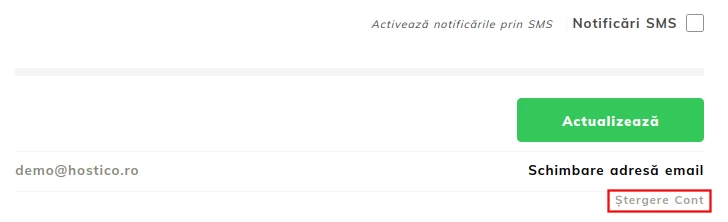
- At the bottom of the Profile section, click on the Delete account option.
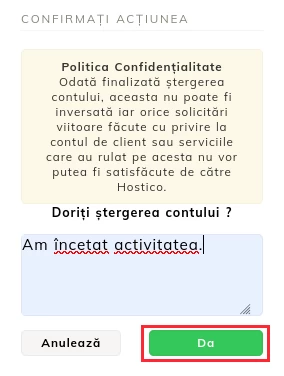
- Enter the reason why you want to delete the client account, then click on the YES button.
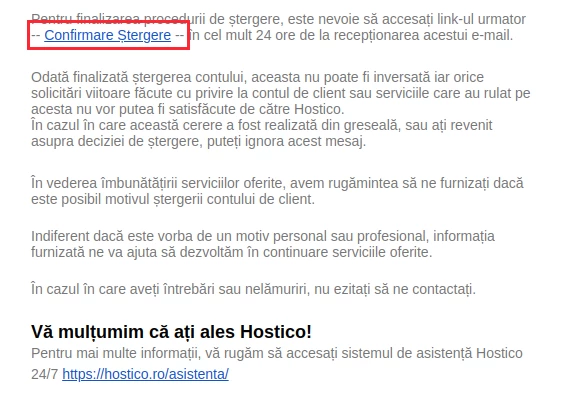
- You will receive a validation email at the address associated with your client account. Open the email, check the information, and click on the Delete Confirmation link.
- After confirmation, you will be redirected to your client account or you will need to log in again to complete the procedure.
Note
- Once the procedure is completed, it cannot be canceled or reversed.
- All personal data, including but not limited to:
- Proforma and tax invoices.
- Email messages.
- Ticket-type messages.
- Phone conversations.
- Chat sessions.
- Any misunderstandings that arise later cannot be attributed to Hostico.
- Hostico cannot be held liable for any material or moral damages resulting from the deletion of the account.
- Requests sent from email addresses or phone numbers not appearing in the account will not be processed.
- Legal or financial-accounting documents related to the collaboration must be kept in physical format for 10 years, in accordance with the legislation in force.
- The account deletion process will take place within a maximum of 24 hours from the completion of the request.