Tutorials • Email
DKIM and SPF Authentication in cPanel
Learn how to configure DKIM and SPF authentication in cPanel to improve the Apache SpamAssassin mail filter. Follow the simple steps for activation.
Views 2132Updated 1 anPublished on 31/01/2018by Cătălin A.
Introduction
This tutorial explains how to configure the Apache SpamAssassin mail filter in the cPanel account.
Requirements
- a cPanel account
Steps to Follow
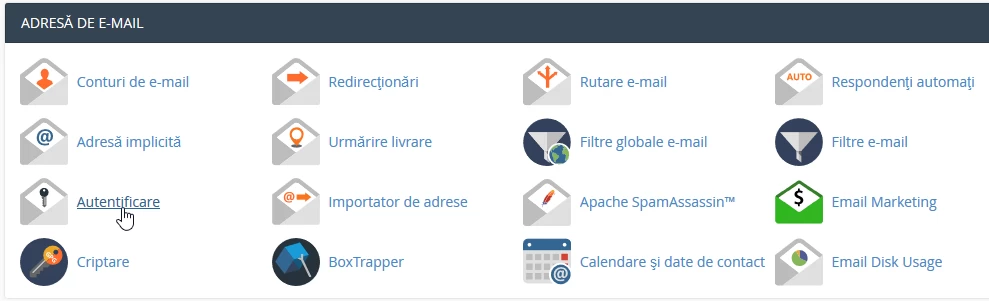
- after logging into the cPanel control panel, in the interface that will be displayed, we look for the section "EMAIL ADDRESS", and there we click on "Login"
- In the next window, DKIM and SPF can be activated as needed by pressing the "Activate" buttons
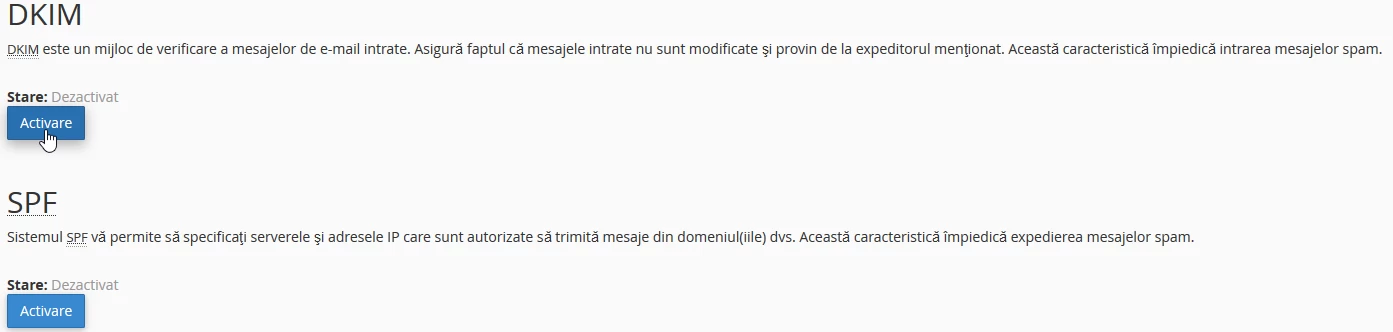
- The advanced settings allow the configuration of DKIM and SPF for multiple domains hosted on the same account or using the email server of the account in question as needed.